


Carrier Services
4.232.93K Reviews
App Specs
- Version
- Varies with Device
- Updated On
- License
- Free
- Downloads
- 5,000,000,000+
- Developer
- Google LLC
- Categories
- Communication
- Platform
- Android
Screenshots
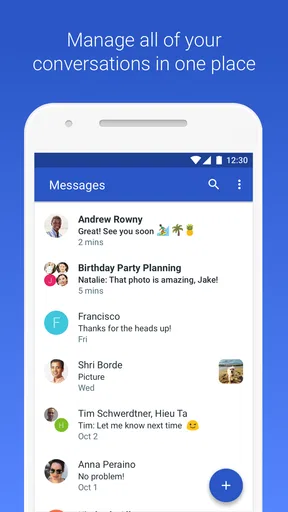
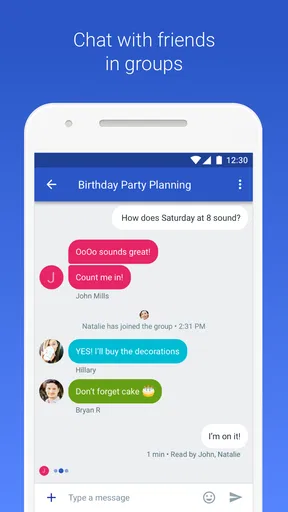

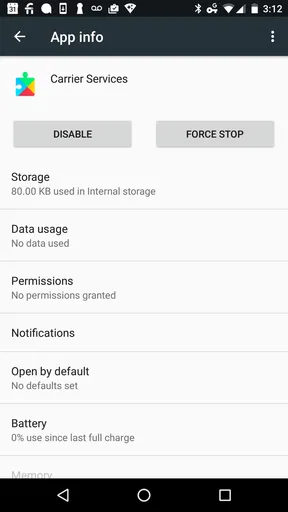
 Analysis by AppCompare
I’d set expectations carefully with Carrier Services: it is a supporting component for mobile-network communication, not a messaging app you open to start a conversation. Its job is largely out of sight, so a quiet first experience is normal. I find that reassuring once I understand its role; there is no new inbox or complicated dashboard to learn, and the useful result is whether supported communication services work smoothly on the phone.
What to expect from a background communication app
Carrier Services is a free communication app from Google LLC, and it has an Everyone age rating. It has a 4.2 average from around 1.9 million ratings, with over 5 billion installs. Those figures show how widely it is used, but they don’t mean every phone owner will notice a visible change: its purpose is tied to carrier-supported services and the phone’s messaging setup.
The key distinction is that this is not an alternative to your regular texting app, nor a general-purpose network booster. It supports newer communication services offered through mobile carriers. That means the app’s usefulness depends on the wider setup around it: your device, carrier, messaging app, and whether the relevant service is available to you. Installing it on its own should not be treated as a promise of stronger signal or a new set of buttons.
Guides and Analysis on Carrier Services
For a first-time user, the practical question is not “What can I do inside this app?” but “Is my phone’s supported messaging working as expected?” If your day-to-day conversations already work, you may never have a reason to interact with Carrier Services directly. I consider that normal rather than a sign that installation failed.
First setup: keep the process simple
On Android, I’d start by checking that I have the Google-published Carrier Services app, then let the phone’s normal app-installation process finish. There is no special account setup described as part of using it, and it is not the place where you compose messages or choose a contact. The best first step is simply to leave the component in place and continue using the messaging app you already rely on.
One useful habit is to change only one thing at a time if you are troubleshooting. For example, if a message feature is missing, first check the messaging app and its available settings, then consider whether your carrier supports that feature. Installing or updating a background component cannot make an unsupported carrier service appear. This avoids the common trap of repeatedly changing phone settings when the limitation sits elsewhere in the chain.
Carrier Services is an Android app, so I would not assume that the same installation path or role applies on iOS. If you use an iPhone, look for communication options that are actually offered by your device, carrier, and chosen messaging service rather than searching for this Android component as a general iOS utility.
Worth Reading Before You Choose

Basketball Stars: Multiplayer Is Fast, but Can It Recover When Matches Go Wrong?

WEBTOON Turns Phone Updates Into a Better Reading Routine

Link to Windows Runs on Shared Habits, Not Social Feeds

How Alibaba.com Dominates the B2B Marketplace

Metro's Quiet Rise: Redefining Mobile Communication

Harnessing Ecosystem Power with Phone Tracker by Number
The first meaningful success is often subtle
After setup, I would test the thing I actually care about instead of waiting for a dramatic notification. If you use carrier-supported messaging, send a normal message to someone you regularly contact and see whether the conversation behaves as expected. If your messaging app offers richer chat functions, check those within that app; Carrier Services itself is not where you manage the conversation.
For instance, imagine you are coordinating a pickup after work and need to send a photo of the meeting spot. You would still open your usual messaging app, choose the conversation, and send the image there. If richer messaging is available in your setup, the supporting service can help enable that experience; if it is not available, the ordinary message route remains the practical fallback. That is a more realistic way to judge the app than looking for a separate Carrier Services screen.
It is also worth separating a successful message from a guaranteed improvement in call quality or reception. A background carrier component is not a substitute for coverage, and a single successful text cannot prove that it has changed network performance. I’d judge it by whether supported communication features are available and dependable over normal use, not by expecting a measurable boost everywhere I go.
Where confusion and friction can appear
The biggest source of confusion is that the app can be installed without looking like a conventional app. People often expect an icon, controls, or an explanation of what changed. Here, the absence of an obvious interface is part of the design role: it supports communication services rather than acting as a destination in its own right. I would not keep opening it to look for messages or troubleshooting tools.
Another easy misunderstanding is to credit every improvement—or every problem—to this component. Messaging depends on several pieces working together, including the phone’s messaging app and carrier support. A delayed message could have other causes, and a feature such as richer media sharing may not be available in every conversation. If one contact has a different device or setup, the experience can differ even when your own phone is configured normally.
There is a trade-off in this quiet approach. You get a component intended to support carrier communication without needing to learn a new app, but you also get little direct feedback about what it has done. If you prefer tools that show diagnostics, explain each setting, or let you manually manage every connection, Carrier Services may feel opaque. I would not recommend treating it as a network-monitoring or signal-repair tool.
It also differs from the usual alternatives in communication. A standalone messaging service is where you typically choose contacts, send messages, and manage conversations. Carrier Services instead supports carrier-provided capabilities in the background, so replacing your messaging app with it would make no sense. If your priority is cross-platform conversations with a consistent interface, choosing a messaging service designed for that purpose is the better decision; this component is relevant when you want the carrier-supported features your phone can use.
What Exactly is Carrier Services?
Okay, let's start with the basics. The Carrier Services app is something you might have stumbled upon without even knowing what it does. It's one of those quiet little apps that sit in the background of your phone and work their magic without needing much attention. Essentially, it's designed to improve the communication between your device and mobile network. Sounds pretty techy, right?
But here's the kicker: you might not see any flashy features because it’s all about enhancing your phone’s ability to send and receive messages, and possibly improving network performance. Think of it as a backstage crew making sure the show runs smoothly.
Installation and Setup
Installing Carrier Services is as straightforward as any other app. You can find it on both Android and iOS platforms. Just hit download, and you’re good to go. Once installed, you won’t need to mess around with it too much, which is great if you’re like me and prefer apps that don’t need constant attention.
The app updates automatically, ensuring you always have the latest enhancements without lifting a finger. It’s like having a personal assistant for your network needs!
Performance and Features
Now, I know what you’re thinking: does it really make a difference? Well, it’s not the kind of app where you’ll see instant changes. It’s more about the subtle improvements over time. For instance, I noticed that my SMS delivery was slightly faster, and the call quality seemed more consistent, especially in areas where the signal was usually spotty.
One of the key features is its ability to work with RCS (Rich Communication Services), which is like SMS on steroids. If your network supports RCS, you can enjoy features like sending high-quality photos and videos, chatting over Wi-Fi, and even seeing when someone is typing. Pretty neat, right?
For a more useful check, I’d compare like with like: try the same kind of message in the same conversation at different times, rather than deciding from one photo or one trip through a weak-signal area. Even then, treat the result as an everyday impression, not a controlled test. Network conditions and the other person’s setup can change the outcome, and this app does not give you a simple before-and-after report.
Who Would Benefit from Carrier Services?
This app is particularly useful if you’re someone who relies heavily on messaging and calling. If you’ve ever been frustrated by delayed messages or dropped calls, Carrier Services might just be your new best friend. It’s there to optimize and enhance, making sure your communication is as smooth as possible.
However, if you’re expecting a visual overhaul or a bunch of new features popping up on your screen, you might be left wanting more. Remember, it’s working behind the scenes.
I’d say it makes the most sense for Android users who want carrier-supported communication to work without managing another app, especially people who use their phone’s default messaging setup and want to make use of richer chat where it is supported. It is a poor fit if you are looking for a new way to message, a manual switch for better reception, or a tool that can resolve a carrier outage. In those situations, your messaging app, carrier support, or a different communication service is the more relevant place to look.
If you are deciding whether to keep it, I would not remove a system-adjacent communication component just because it has no obvious screen or because you rarely notice it. On the other hand, there is no need to install it expecting it to repair weak coverage by itself. For most people, the sensible approach is to leave it available and focus on whether the messaging features they actually use are working.
Final Thoughts
So, would I recommend Carrier Services? Absolutely, especially if you’re all about better connectivity. It’s not going to transform your phone overnight, but it will make those small improvements that add up over time. Plus, the fact that it runs quietly in the background and updates on its own is a huge win in my book.
In a nutshell, if you’re looking to boost your messaging and calling experience without having to do anything extra, give Carrier Services a shot. It’s a small app with a big impact, and who doesn’t love that?
That’s all from me for now. If you decide to try it out, let me know how it works for you. Until next time, happy texting!
Pros
- Enhances communication app performance.
- Improves syncing for messaging services.
- Regular updates for optimal functionality.
- Reduces data usage in background processes.
- Supports newer network technologies.
Cons
- Limited user interface visibility.
- Requires frequent updates.
- May not support older devices.
- Occasional compatibility issues.
- Consumes background data.
FAQs for Carrier Services
What is Carrier Services and why do I need it?
Carrier Services is an app developed by Google that helps enhance the functionality of your mobile network. It enables the latest communication services from mobile carriers, including battery optimization and improved signal reception. It's crucial for ensuring that your device can leverage the newest network features, especially for messaging and internet connectivity.
Does Carrier Services affect my phone's performance or battery life?
Carrier Services is designed to optimize network-related tasks, which can positively impact performance by ensuring efficient use of network resources. While it operates in the background, its impact on battery life is minimal. Most users report no noticeable difference in battery usage after installation, as it is optimized to be resource-efficient.
Is it safe to uninstall Carrier Services from my device?
While you can uninstall Carrier Services, doing so may impact the performance of certain network-dependent features on your phone. It is recommended to keep the app installed to ensure the best possible experience with your carrier's services, such as improved messaging capabilities and faster network speeds.
How do I update Carrier Services and is it necessary?
Carrier Services updates automatically through the Google Play Store to ensure you always have the latest features and improvements. Keeping the app updated is necessary to maintain optimal network performance and access the newest enhancements provided by your carrier, such as better call quality and messaging services.
Can Carrier Services resolve network-related issues on my phone?
Carrier Services can help improve network connectivity and performance, but it may not directly resolve all network-related issues. If you experience persistent problems, such as frequent call drops or slow internet speeds, it is advisable to contact your mobile carrier for assistance, as they can provide more specific solutions.


